

Blocky Character Concept: Keep Portrait Identity Cues Readable
Plan a blocky character concept from a portrait by identifying recognizable features and comparing the design at two sizes.
What's new on this page
- 2026-10-29 — Page published. Clarified the guide’s search focus, added a practical FAQ and replaced the embedded video with an image.
A blocky character concept derived from a portrait needs a few visible identity cues rather than every photographic detail. Use the worksheet to select those cues and inspect whether they still read at both full and small sizes.
This guide provides a portrait-cue worksheet and a practical comparison exercise for a blocky character concept. A portrait composite and a character illustration are different from an import-ready game texture. Prepare that texture separately using the intended model's layout and requirements.
Blocky character concept: identify the features a friend would notice
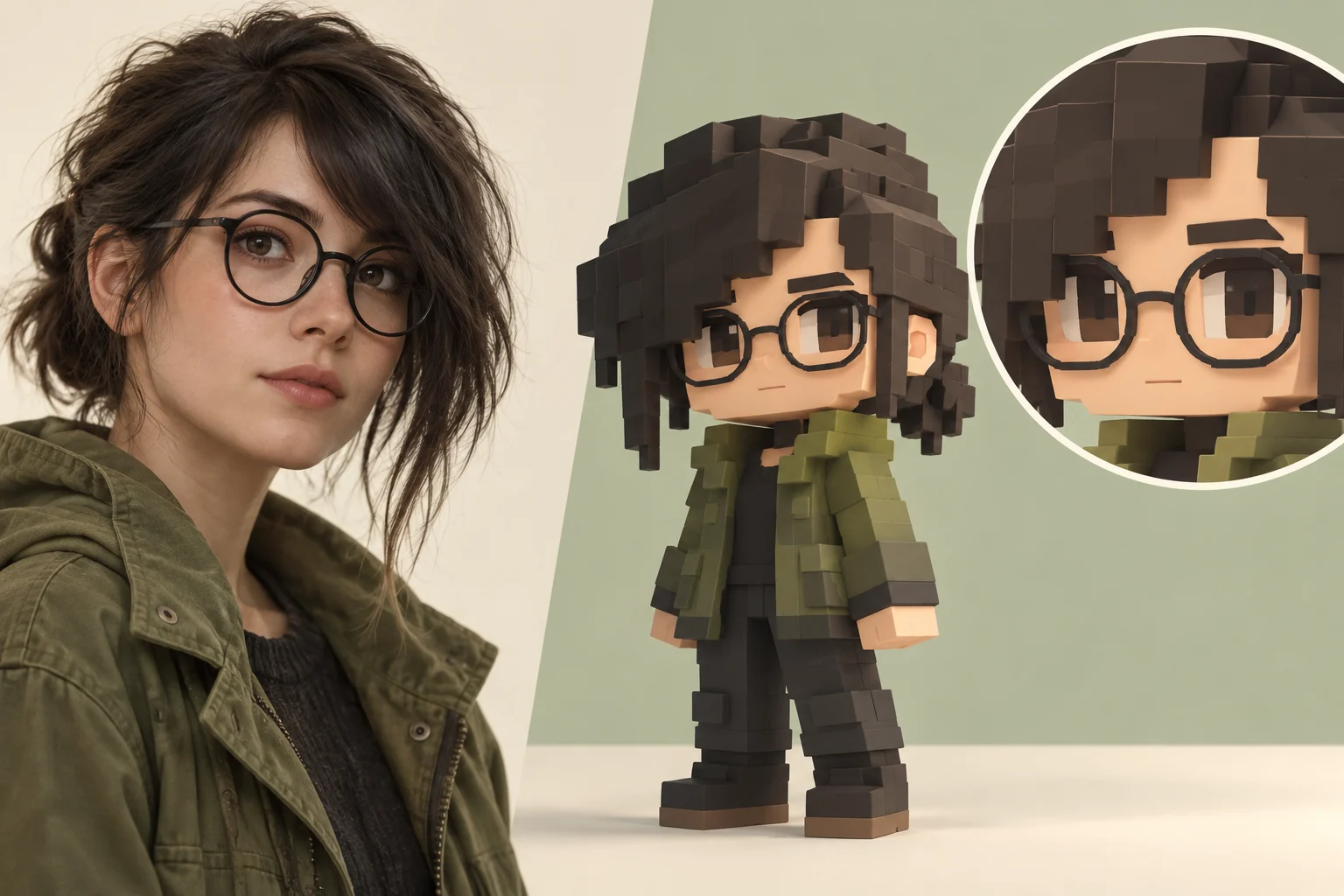
Use a fictional adult with round black glasses, an asymmetrical dark fringe and a moss-green jacket. Before requesting an image, write three separate observations: the glasses frame the eyes, the fringe creates an uneven hairline, and the jacket supplies a broad green area below the face.
Those observations describe relationships, not tiny photographic details. The glasses should remain distinct from the eyebrows. The fringe should not cover both eyes. The jacket should not become the same dark tone as the hair. You can evaluate those conditions in a simplified concept even when the rendering style changes.
The cover illustrates this fictional portrait and a blocky interpretation. The face inset helps show which details deserve a closer look.
Prepare a reference that answers the right question
Choose a photo with a clearly visible face and enough of the outfit to support the character idea. If glasses are the main cue, avoid a source where reflections completely obscure the eyes. If the fringe matters, avoid cutting it off at the top of the image.
A group photo creates an extra selection problem. A heavily tilted pose can hide one lens and make the fringe difficult to read. Prefer a simpler candidate when you have one. Keep the untouched source so you can compare a later crop against it rather than relying on memory.
Do not enlarge a very small face repeatedly and assume that the resulting file contains more identity information. Inspect what is actually visible. If you cannot describe a feature from the source, mark it as a design choice instead of asking a later image to recover it reliably.
Use a cue worksheet
Write one preservation instruction and one failure condition for each feature:
-
Cue: Glasses; Preserve: A readable dark frame around two visible eyes; Reconsider the candidate when: The frame and eyes merge into one solid band
-
Cue: Fringe; Preserve: An asymmetrical edge above the face; Reconsider the candidate when: It becomes a different hairstyle or hides the expression
-
Cue: Face; Preserve: Clear separation from hair and glasses; Reconsider the candidate when: Shadows remove the distinction between those regions
-
Cue: Jacket; Preserve: A broad moss-green clothing area; Reconsider the candidate when: Tiny patterns distract from the main color and shape
This worksheet is an original review aid. It is not a facial-recognition score or a promise that a model will preserve a person's identity. Keep your judgment tied to what the candidate visibly shows.
Request a concept with a limited brief
Open the site's image generator and inspect the available modes. Use a reference mode only when its controls accept the image you intend to provide. A general image workspace and a face-compositing workflow may serve different purposes; the active form should determine the request.
An original suggested direction for this fictional character is:
Create a blocky character concept with round black glasses, an asymmetrical dark fringe and a moss-green jacket. Keep both eyes readable inside the glasses. Separate the hairline from the frames and use broad clothing shapes. Show the upper body against a simple light background. No labels, logos or interface elements.
Adapt the wording to the actual source and selected mode. This guide does not report a paid generation test. Read the current quote and purchase options before submitting a task.
Compare the face at two sizes
Look at the candidate as a small preview first. Can you still distinguish eyes, frames and fringe? Then enlarge it to inspect the shape of the glasses and the boundary around the hair. A design that is attractive close up may lose its main cue when reduced.
If the glasses become a dark band, simplify nearby detail before adding more decoration. If the fringe changes into a symmetrical shape, make that specific difference the next revision request. Changing the jacket, pose and background at the same time makes it harder to see whether the face instruction helped.
Record one observation beside each candidate. Keep the preferred source, concept and prompt together. The comparison should tell you what changed, not merely which image you liked.
Carry the appearance into the correct deliverable
For a profile image, you may only need the concept artwork and an appropriate crop. For an in-game character, use a skin editor to place the design onto the intended body layout and check it on a rotating model. A portrait crop cannot supply the back of the head or the outfit automatically.
Decide those unseen areas deliberately. Continue the hairstyle consistently and keep the jacket simple enough to recognize from the side. Save the final texture separately from the concept image, then verify it in the appropriate skin workflow. The portrait worksheet has done its job when the important cues remain clear through that handoff.
Frequently asked questions
Which portrait details should a blocky character concept preserve?
Start with features that distinguish the subject, such as the outline of the hair or glasses when present. Choose details visible in the reference and check whether they remain clear at the final display size.